
MThings
MThings
Multi-protocol industrial control host software supporting MODBUS, Siemens S7, IEC 60870-5-101/104, DL/T 645-2007, CJ/T 188-2018, and DL/T 698.45 for SCADA monitoring, historical data, alarms, logic control, and data gateways.
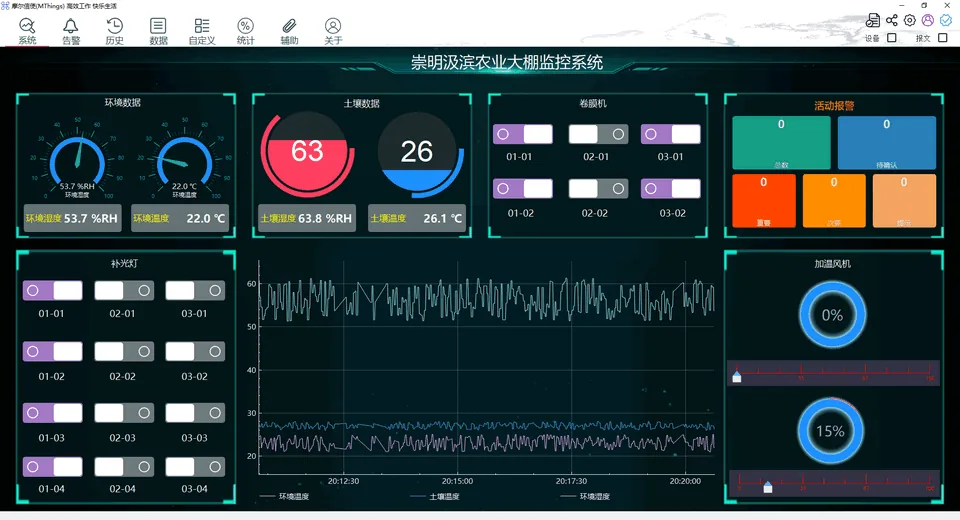
Completely free forever, professional industrial control host software
No conditions attached
CJ/T188-2018
DL/T698.45
Download
Get MThings and start instantly
Download the latest desktop package, view release notes and prepare your device in a few minutes.
Windows installer
Recommended for most users, with a complete setup wizard and default runtime components.
Download for WindowsLinux installer
Supports Ubuntu 20.04/22.04/24.04 amd64 and compatible Debian-based distributions. Ubuntu 22.04 amd64 is recommended.
Download for LinuxAutomation Configuration SKILL
No onboarding required. Integrate with major platform agents to generate engineering configuration files in one click.
Download Skill FileUser manual
View operation guides, feature descriptions, and solutions to common issues.
User ManualProduct white paper
Learn about product architecture, core capabilities, supported scenarios and deployment recommendations.
View White PaperEngineering-grade multi-protocol host software
Commissioning · Monitoring · Integration · Telecontrol · Energy · Production
Device commissioning and troubleshooting
- MODBUS · Siemens S7 · IEC 60870-5-101/104 · Metering protocols
- Device scan · Batch read/write · Master/slave simulation
- Packet analysis · Curve logging · Timing and loss tests
Production monitoring
- SCADA screens · Live status · Process data
- Historical data · Trend curves · Event tracing
- Real-time alarms · Logic control · Linked actions
Data acquisition and system integration
- Multiple devices · Multiple channels · Parallel acquisition
- Data gateway · MQTT forwarding · MES integration
- EdgeWeb · Linux · Localized hardware
Dedicated sensor host software
- Temperature · Pressure · Flow · Displacement
- Serial · RS485 · TCP/UDP
- Live curves · Data logging · Threshold alarms
Energy metering and management
- DL/T 645 · CJ/T 188 · DL/T 698.45
- Electricity · Water · Gas · Heat meters
- Batch acquisition · History curves · Anomaly alarms
Production line monitoring
- PLCs · Inverters · Instruments · IPCs
- Operating status · Process values · Real-time alarms
- SCADA · Logic control · MES data flow
Five Core Capabilities
Visualization · Control · Records · Alarms · Data connectivity
SCADA Monitoring
Rich controls · Multi-page · WYSIWYG · 100 ms refresh · Visual control
Logic Control
Visual blocks · Data processing · Closed-loop control · Fault intervention · Automated testing
Historical Data
Second-level acquisition · Persistent storage · Filtered search · Trend reports · Data export
Real-time Alarms
Flexible triggers · Alarm levels · Persistent records · Statistics · Anomaly response
Data Gateway
MODBUS / MQTT · Serial / Ethernet conversion · Multi-mode forwarding · Device aggregation
Platform
System status
Real-time alarms
Historical data
Logic control
Linux release adaptation
Data gateway
MQTT forwarding
EdgeWeb
Localized hardware
Multi-Projects
Dynamic data simulation
Packet parsing
Curve logging
Timing test
Packet loss statistics
Polling
Batch write
Custom packets
Packet records
One-click device scan
Multi-Devices
Field devices
Simulated slave
MODBUS
ASCII
RTU
TCP
Siemens S7
Industry protocols
DL/T645-2007 · CJ/T188-2018 · DL/T698.45
IEC 60870-5-101/104
Multi-Channels
Serial port
RS485
TCP
UDP
Ethernet
IEC 60870-5-101/104
What we do
Professional services for engineering delivery
Software Customization
Customized software development for project requirements and deployment needs.
Engineering Point Configuration
Assist with device points, communication mapping, and engineering configuration planning.
SCADA Design
Provide interface structuring, screen layout, and industrial visualization design support.
Software Training
Offer product onboarding, operation guidance, and usage training for project teams.
FAQ
Frequently Asked Questions
Answers to common questions about protocols, device compatibility, commissioning, and industrial deployment.
Which industrial protocols does MThings support?
MThings supports MODBUS-RTU, MODBUS-ASCII, MODBUS-TCP, Siemens S7, IEC 60870-5-101/104, DL/T 645-2007, CJ/T 188-2018, DL/T 698.45, and TCP/UDP passthrough for integrating PLCs, meters, inverters, and similar devices.
Which industrial devices and deployment scenarios is it suitable for?
MThings can be used with PLCs, meters, inverters, touchscreens, IPCs, and other industrial control devices, and is suitable for multi-protocol monitoring, on-site debugging, and data gateway projects.
Can MThings run offline?
Yes. Core functions such as device communication, monitoring, and data acquisition do not require a continuous internet connection. Internet access may still be needed for downloads, updates, and online support.
Which Siemens S7 PLCs and connection methods are supported?
MThings supports Ethernet communication with commonly used Siemens S7-200, S7-200 SMART, S7-300, S7-400, S7-1200, and S7-1500 PLCs. Compatibility can vary with the CPU, firmware, and network configuration, so verification with the actual device is recommended before deployment.
What can the one-click device scan do?
One-click device scan can quickly search for communicable devices and help add them to a project, reducing manual device-by-device configuration and testing. The scan range and results depend on the selected protocol, communication parameters, and field network environment.
Which services require payment?
MThings itself is permanently and fully free. Fees only apply when you need professional services such as custom software development or engineering design, and are based on the specific requirements.
Support & Contact
Scan the QR code below to contact us through the service account or the public account.
Email: mthings986@163.com
WeChat: mthings999

Service Account
